
Shortcodes are one of the most powerful features in WordPress. They allow you to add dynamic, reusable content anywhere on your website without rewriting complex PHP code in every template file. If you are building a custom theme or modifying a child theme, shortcodes give you flexibility, scalability, and cleaner code management.
The Problem: Repeating Code Across Multiple Theme Files
When developing a WordPress website, you often need to display the same content repeatedly. This could be a phone number, contact button, promotional message, disclaimer, or call-to-action section. Many developers manually copy and paste the same code into header.php, footer.php, single.php, and page.php.
This approach works temporarily, but it creates long-term maintenance problems. Every time you need to update that content, you must edit multiple files manually. This increases the chances of mistakes and inconsistencies.
The Agitation: Hardcoded Content Hurts Scalability
Hardcoded content makes your website difficult to manage as it grows. If your business expands, or if you rebrand and need to change contact details or messages, updating multiple files becomes frustrating. This wastes development time and affects productivity.
For SEO-focused websites, clean and maintainable code structure also plays an important role in long-term performance. Messy templates can lead to structural issues that impact page speed and user experience.
The Solution: Use WordPress Shortcodes
Shortcodes solve this problem by allowing you to define content once and reuse it anywhere using a simple tag like +91 99999 99999. Let’s go step by step.
Step 1: Create a Shortcode Function in functions.php
Open your theme’s functions.php file and create a function that returns the content you want to display.
Important: Always use return instead of echo. The return statement sends content back properly to WordPress, while echo may break layout positioning.
Syntax:
function function_name() {
    return 'value';
}
Note: Always use a unique function name to avoid conflicts with plugins or other themes.
Example:

Step 2: Register the Shortcode
After creating the function, register it using the add_shortcode() function. This tells WordPress to connect your shortcode tag with your PHP function.
Syntax:
add_shortcode('shortcode_name', 'function_name');
Once registered, WordPress will recognize your shortcode as valid.
Example:
Step 3: Use Shortcode Inside Theme Files
You can use the shortcode inside theme files like header.php, footer.php, single.php, or page.php by running it through do_shortcode().
- header.php
- footer.php
- single.php
- page.php
Syntax:
<?php echo do_shortcode('[shortcode_name]'); ?>
Example:

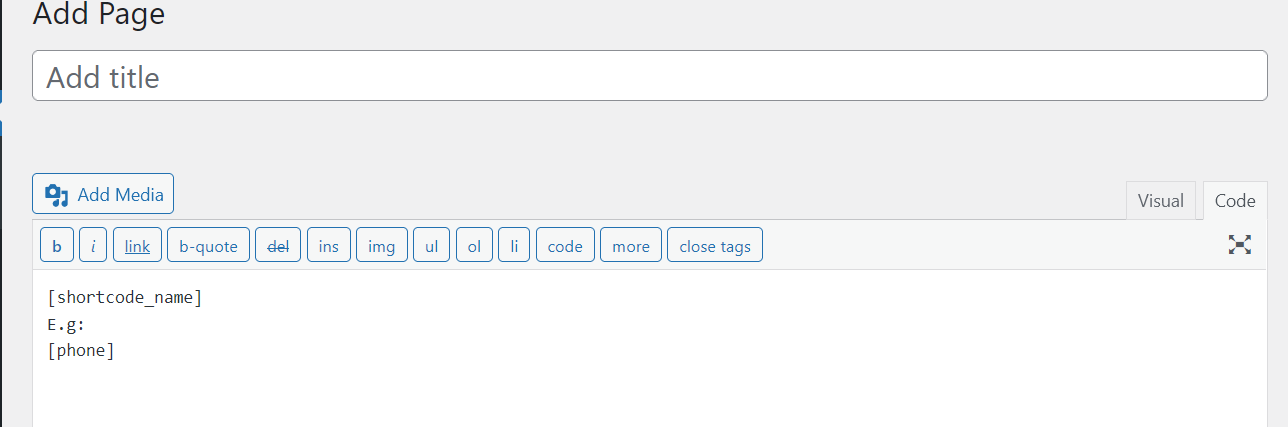
Step 4: Use the Shortcode in Pages or Posts
You can also use the shortcode directly inside WordPress posts or pages without writing any PHP code. Simply place the shortcode where you want the output to appear.
Syntax:
[shortcode_name]
Example:
Advanced Tip: Returning HTML in Shortcodes
Shortcodes are not limited to plain text. You can return HTML elements such as buttons, spans, div containers, or styled sections. This allows you to maintain consistent design elements across your entire website.
function display_phone_number() {
    return '<span class="contact-number">+91 9999999999</span>';
}
add_shortcode('phone', 'display_phone_number');
This approach improves UI consistency and simplifies design updates.
SEO and Performance Benefits
Using shortcodes improves your WordPress development workflow in several ways:
- Reduces duplicate code
- Improves maintainability
- Keeps templates clean
- Makes updates faster
- Improves scalability
Cleaner structure often leads to better performance optimization, which supports improved user experience and search engine visibility. Faster websites typically achieve better engagement metrics.
Best Practices for Creating Shortcodes
- Always use unique function names
- Use return instead of echo
- Sanitize and escape output properly
- Use a child theme to prevent data loss during updates
- Keep logic lightweight for better performance
Conclusion
Shortcodes are a simple yet powerful feature that can significantly improve how you manage dynamic content in WordPress. Instead of repeating code across multiple theme files, you define it once and reuse it everywhere with a clean, readable tag.
If you are serious about custom WordPress development, mastering shortcodes will make your projects more scalable, maintainable, and efficient. Start using them today and experience cleaner, smarter development.